Unregister Recover My Files
Follow these instructions to remove the Recover My Files activation key from your computer. If you no longer have Recover My Files installed, you can download the software, reinstall it, then follow these instructions:
In Windows XP, select Start > Run and copy and paste the following;
In Windows Vista / 7 click on the Windows start button and in the "search programs and files box" copy and paste the following:
"C:\Program Files\GetData\Recover My Files v4\RecoverMyFiles.exe" UNREGISTER
For 64 bit systems, use:
"C:\Program Files (x86)\GetData\Recover My Files v4\RecoverMyFiles.exe" UNREGISTER
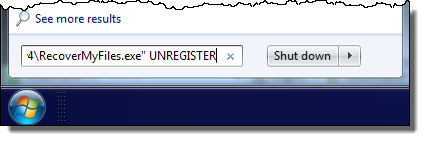
An information window will appear on the screen which says:
"If you continue, the program key will be permanently removed from your system, and you will not be able to reinstall it".
Click OK to continue. You will then see a window which says:
Program key removed. Your confirmation code is shown below. PLEASE COPY THIS DOWN -- you will need to confirm that you have removed the program. Press all three of the numbered buttons to confirm that you have copied it down, then press OK."
Email support@getdata.com the code Un-Install Code and we will contact you with further instructions.
Thank you.